
How to Create a Privacy Manifest for Your iOS App or SDK

Table of Contents
- Introduction
- What is a Privacy Manifest?
- Creating a Privacy Manifest in Xcode
- Configuring the Privacy Manifest
- Additional Considerations
- Conclusion
Introduction
Apple’s privacy manifest requirements are already in effect; May 2024 is no longer an upcoming deadline. A manifest describes data collection, tracking and use of required reason APIs. What you need to declare depends on your app and its dependencies, rather than a blanket statement that every SDK has identical requirements. Start with Apple’s privacy manifest documentation.
Review both your own code and the SDK versions shipped in the app. Apple maintains a list of third-party SDKs with manifest and signature requirements; check that list rather than assuming an older package is suitable for a new release. The app developer remains responsible for the third-party code included in the submission.
This guide explains the file structure and a release-review workflow. A manifest records privacy practices; adding one does not itself change the app’s behaviour or guarantee App Store approval.
What is a Privacy Manifest?
A privacy manifest is a property list file (with the extension .xcprivacy) that contains information about your app’s or SDK’s data collection practices and the reasons for using specific privacy-sensitive APIs. This file must be included in your app’s or SDK’s bundle and added to your target’s resources in Xcode.
Creating a Privacy Manifest in Xcode
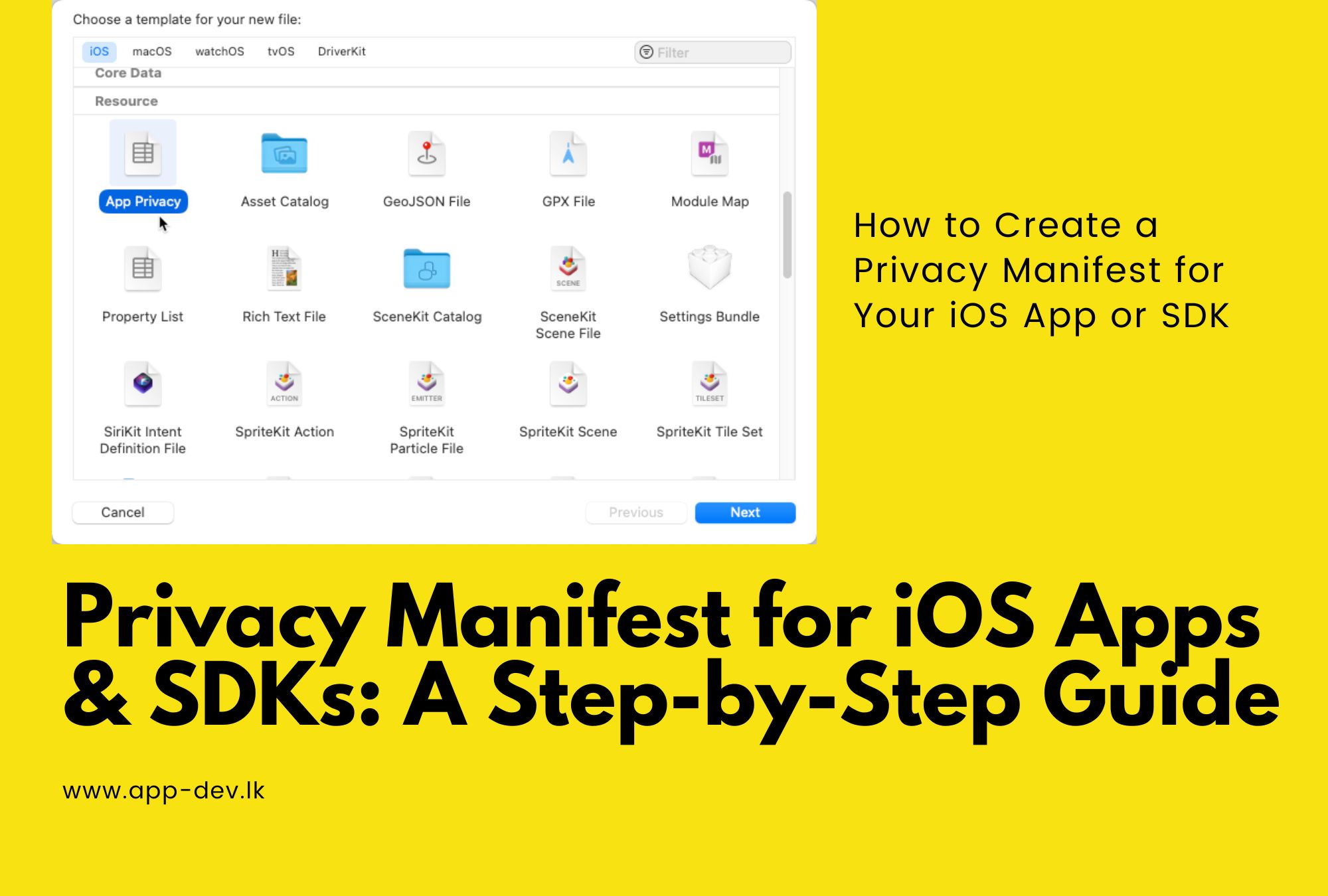
Follow these steps to create a privacy manifest in Xcode:
- Go to File > New > File.
- Under the Resource section, select “App Privacy File” as the file type.
- Click Next, and ensure that your app’s or SDK’s target is checked in the Targets list.
- Click Create.
By default, the file will be named PrivacyInfo.xcprivacy, which is the required name for bundled privacy manifests.
Configuring the Privacy Manifest
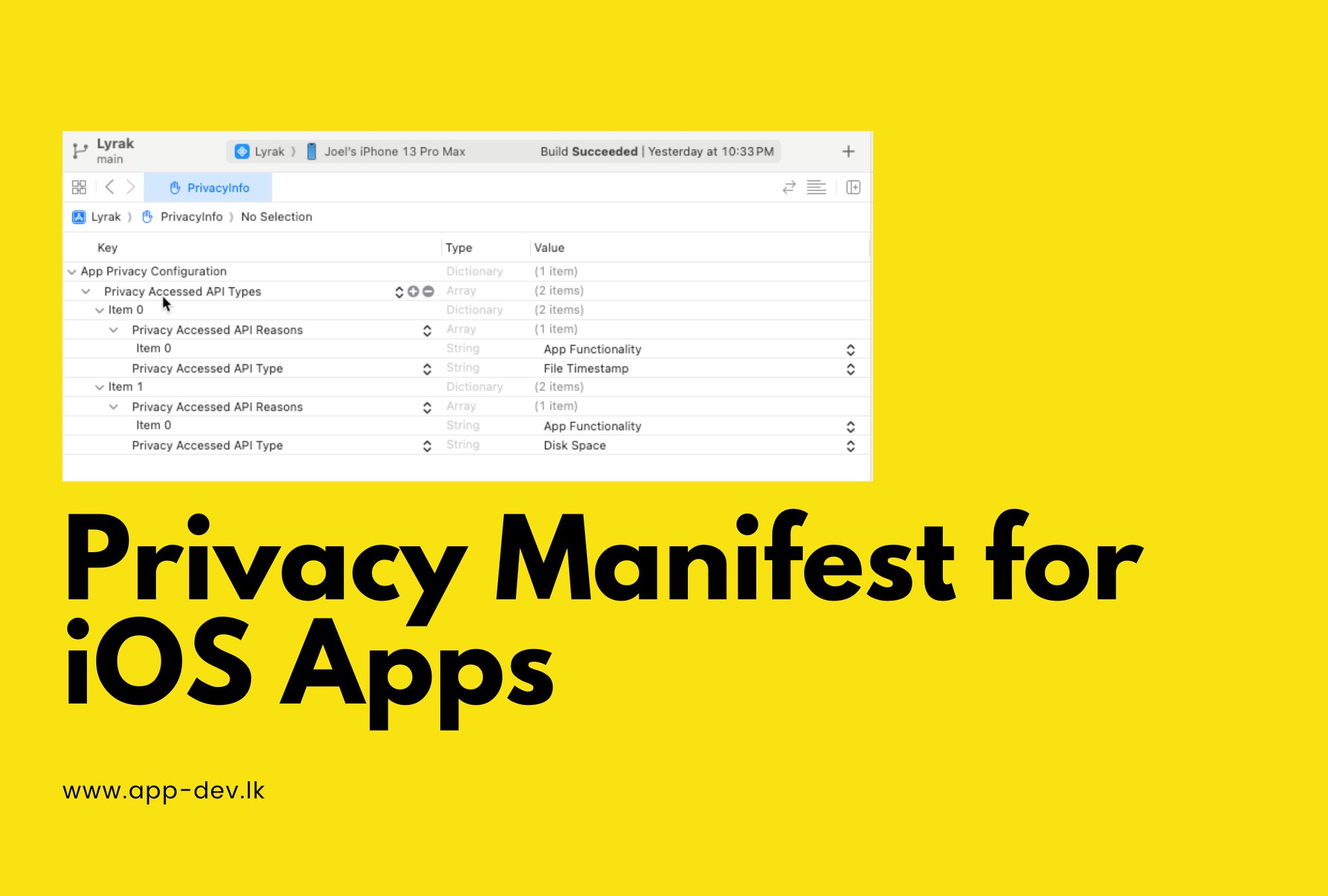
After creating the privacy manifest file, you need to add the following top-level keys to the dictionary:
NSPrivacyTracking
A boolean indicating whether your app or SDK uses data for tracking as defined under the App Tracking Transparency framework.
NSPrivacyTrackingDomains
An array of strings listing the internet domains your app or SDK connects to for tracking purposes.
NSPrivacyCollectedDataTypes
An array of dictionaries describing the data types your app or SDK collects.
NSPrivacyAccessedAPITypes
An array of dictionaries describing the privacy-sensitive API types your app or SDK accesses and the reasons for accessing them.
The NSPrivacyAccessedAPITypes array is where you’ll list the specific API categories and the approved reasons for using them, as outlined by Apple.
For each category of required reason APIs that your app or SDK uses, you’ll need to add a dictionary to the NSPrivacyAccessedAPITypes array. Each dictionary should contain the following keys:
- NSPrivacyAccessedAPIType: A string identifying the category of required reason APIs your app or SDK uses. The value must be one of the approved categories listed by Apple.
- NSPrivacyAccessedAPITypeReasons: An array of strings identifying the approved reasons for using the APIs. The values must be the approved reasons associated with the accessed API type, as listed by Apple.
Use Apple’s required reason API reference to select reasons that match the actual calls in your code. Do not copy a reason code from another app simply to silence a warning. If a dependency makes the call, check its implementation and the vendor’s declaration before deciding what your own app must report.
Additional Considerations
- If you distribute your third-party SDK as a static library, use the support for static frameworks in Xcode 15 or later to bundle resources, including the privacy manifest file.
- Review the manifests supplied by SDK vendors and update dependencies when necessary. Xcode can combine SDK declarations into a privacy report to help review the app’s privacy information.
- Your privacy manifest should accurately reflect your app’s or SDK’s functionality and data usage practices. Providing misleading information or using the APIs for purposes other than the declared reasons may result in your app or SDK being rejected or removed from the App Store.
Conclusion
Before submission, review the release archive rather than just the source folder. Confirm that the intended target includes the manifest, investigate validation messages and record which dependency versions were checked. Apple’s bundle placement and validation guide explains how invalid files are reported, including files supplied by an SDK.
Assign an owner to repeat this review when analytics, advertising, authentication or storage dependencies change. Keep the implementation, declarations and user-facing privacy information consistent. Use the app-store launch checklist for the wider release process, and discuss implementation support through our mobile app development services.
Related articles



About the author
Joel Jerushan writes about mobile apps, websites, AI, SEO, and practical technology choices for growing businesses.
Learn more about App Dev Sri Lanka
